What a Complete Senior Living Listing Should Include
Half the fields on a senior living listing do not change whether a family reaches out. Here is a list of which ones do, and why completeness and placement are two different things.
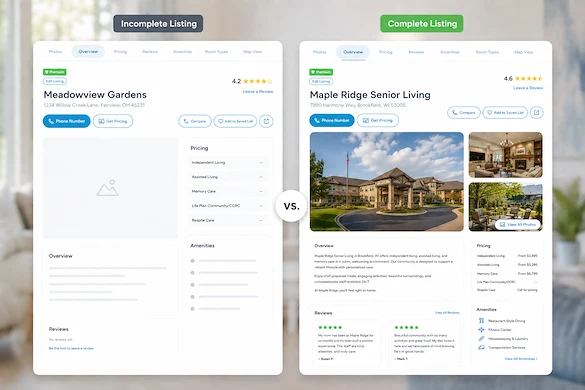
Most senior living listings are technically complete and practically empty. The easy fields are filled in. The ones a family reads immediately before deciding whether to call are the ones left blank.
If your listing is already set up, this is the next question: not how to fill it in, but which parts of it are doing any work. Setup mechanics are covered in How to Set Up Your Listing. This piece is about what belongs in it and why.
Want to learn more about your listing? Chat with a team member.
What should a complete senior living listing include?
A complete senior living listing answers the four questions a family asks before they call:
- What care levels the community provides?
- What it costs to live there?
- What the place actually looks like?
- Who to contact
A listing missing any one of those sends the family to a community that answers it, regardless of how strong your community is.
Everything else on the form matters less than those four. Treat them as the floor rather than the goal, and finish them before spending time anywhere else on the page.
It is worth being precise about who the reader is. In most searches, the person reading your listing is an adult child, often at night, often comparing three or four communities in one sitting, and usually working from a phone. That reader is not evaluating your community on its merits. They are deciding whether it belongs on a shortlist, and a missing answer is the fastest way off that list. A blank field does not read as harmless to that reader. It reads as either "they do not offer this" or "they will not say," and both cost the call.
Which fields actually change whether a family reaches out?
Five fields carry most of the weight: care levels stated specifically, cost information in whatever honest form you can give, current photographs of the real community, a contact route that reaches a person, and availability if someone owns keeping it accurate. The rest of the form is worth completing, and it does not decide the call.
Care levels, stated specifically. "Assisted living" is a category, not an answer. Whether you accept a resident who needs two-person transfer assistance, whether you have a secured memory care neighborhood, and whether a resident can stay as their care level rises are the questions an adult child is actually trying to settle. A family that cannot tell whether you serve their parent will not call to find out.
Cost information, in whatever form you can honestly give it. A range beats nothing. A range with what is included and what is billed separately beats a bare range. Cost is the most common point at which a family stops reading, and a blank cost field tends to read as expensive rather than as unstated. If your rates genuinely depend on an assessment, say that in the field rather than leaving it empty.
Photographs of the real community. Current interior photographs of the spaces a resident uses daily do more work than a hero shot of the entrance. Families are looking for evidence that they are seeing the actual community rather than a rendering or a stock interior, and they are unusually good at spotting the difference. Dated photographs carry a similar cost to dated reviews: they raise a question about what has changed.
A contact route that reaches a person. A number that rings a main line at four o'clock on a Friday is a lost inquiry. Check that the contact on your listing reaches whoever actually handles a family's first call, and check it the way a family would, by calling it at an inconvenient hour.
Availability, only if someone owns it. A stale availability field is worse than an empty one, because it produces a call that ends in disappointment and a family that discounts the rest of the page. Fill it if a named person updates it. Leave it if not.
Does a more complete listing move us up the results?
No. Completeness and position are two separate things on Senior Care Finder, and it is worth being exact about which is which. Completeness changes what happens after a family arrives at your listing. Position changes how many families arrive at it. Improving one does not move the other.
Position works like this. Premium listings hold the top two positions in relevant search results. The third position always goes to a claimed listing, whether or not that provider pays. Every provider is listed and findable whether they pay or not, so Premium changes where families see you rather than whether they can find you at all.
Completeness does something different, and it is the half that most operators control without spending anything. Two communities in the same position, with the same care levels, are not equally likely to get the call, and the difference is what is on the page. A complete listing in position four can beat an empty one above it, because a family reading both is choosing on content at that point rather than on order.
That distinction matters for how you spend the next hour. If families are finding your listing and not calling, the problem is on the page and completeness is the fix. If nobody is reaching the listing at all, completeness will not solve it and you are looking at a visibility question instead. Those two problems produce the same symptom, a quiet phone, and they have different answers.
Worth clearing up one thing while we are here: Claimed and Verified are the same thing on Senior Care Finder, and both are free. Verified is not a paid upgrade over Claimed. If your listing is claimed, it is verified.
How often does a listing need updating?
Set a quarterly review and a shorter trigger list. The quarterly review catches drift in photographs, contact routing, and cost ranges. The trigger list matters more: update the listing the same week a care level changes, a rate structure changes, the person handling first calls changes, or a renovation finishes.
The quarterly review is the part most communities schedule and then quietly skip, so give it an owner and a fifteen-minute slot rather than an intention. The trigger list is the part that actually protects you, because those four events are the ones that make a listing wrong rather than merely dated, and a wrong listing costs more than a thin one.
A listing is not a form you complete once. It is the version of your community that exists when nobody from your team is in the room, and it is doing that work every night whether it is current or not.
A thirty-minute listing audit you can run this week
Open your listing on a phone, not a desktop, and work down this list. Most communities find two or three fixes worth making immediately.
- Read the first screen only. Can a family tell what care levels you provide without scrolling? If not, fix that field first.
- Check the cost field. If it is blank, decide today what you are willing to publish: a range, a starting figure, or a sentence explaining that rates follow an assessment.
- Count the photographs that show interior spaces a resident uses daily. If the answer is fewer than three, that is this month's task for whoever has a phone camera.
- Call the contact number on the listing from outside the building, late on a weekday afternoon, and note what happens.
- Confirm your listing is claimed. If it is claimed, it is verified, and both are free.
- Set a calendar reminder for the quarterly review and name the person who owns it.
None of that requires budget approval, and all of it changes what a family sees before they decide whether your community is worth a phone call.
Frequently asked questions
Publishing a starting figure with a clear statement of what it includes is generally more useful to a family than leaving the field blank, because the blank field is read as expensive rather than as unstated. If your rates genuinely depend on a care assessment, say that in the field. The goal is not precision, it is giving a family enough to decide whether your community is in their range.
One named person, and usually whoever handles first calls rather than whoever handles marketing. The person who answers family questions all day already knows which fields keep coming up as questions, which is exactly the information the listing should be answering in advance. Corporate marketing can own the standard; the community should own the content.
Indirectly, and it is not the whole answer. Assistants assemble answers from multiple independent sources and weight agreement between them, so an accurate and current listing is one of the corroborating sources describing your community. It is a source you control, which is why it is worth keeping right. It will not on its own determine whether an assistant recommends you.
Yes, and the disagreements are worth an hour to find. Inconsistent care levels, addresses, phone numbers or names across directories create doubt for a family checking two sources and weaken how consistently your community is described anywhere those sources are read. Pick the version that is correct, then make the others match it.
Claim your listing, or talk to our team
Every provider is listed on Senior Care Finder and findable whether they pay or not. Claiming your listing is free, and a claimed listing is a verified listing. Families pay nothing, need no login, and connect with you directly. SCF takes no referral fee, no commission on a move-in, and no per-lead payment, so nobody is standing between you and the family.
If you want to talk through what Premium changes about where families see your community, our team can walk you through it.
Talk to our team.